This page lets you download a .zip file of Back-to-School resources: one-pagers for school staff and parents, email text for encouraging the use of SchoolCash Online, and multiple posters and social media imagery. All of this material already contains your district's name and SchoolCash Online URL, so there is minimal updating required.
Choose your district
Specify your district name:
Can't find your district name? Contact your CSM, and we'll generate the file for you.
Download your file
Click the button below to download the .zip file to your computer. Note: The button activates when you specify a district above.
Download your Toolkit
Issues with your download? Contact your CSM, and we'll generate the file for you.
What to do next:
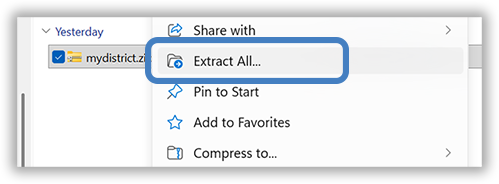
The .zip file contains a collection of individual files. If you are using Windows, after you have downloaded the .zip to your computer, right-click it, and choose "Extract All".
If you are using a Mac, double-click the file in the Finder. The built-in Archive Utility will automatically decompress the contents, creating a new folder with the extracted files in the same location as the original .zip file.
What you'll find:
After you extract the .zip, the files are organized in subfolders.
Above is the initial view of the .zip. We've placed a copy of your SchoolCash Online QR code at this top level, plus and a copy of your district logo.
Note:
We've auto-inserted the QR Code into relevant documents in the collection, but we didn't auto-insert your logo, because you may have a brand guideline to follow. The logo image is our best guess at what you could use, and it's available for you to paste into the various logo placeholders in the documents.
Above is what you see when you double-click into the "Back-To-School 2026 Resources" folder.
There's an "About These Files" document at this level that serves as a guide for all of the content available in the other subfolders.